Pestival 'celebrates the art of being an insect through awe-inspiring hands-on and multi-platform events and ideas, leading up to a biennial festival with a local and global reach.' As part of the project they created the Termite Pavilion - a model of the inside of a termite mound, scaled up to human size from a 3D scan of a termite mound from Namibia.
The resulting structure, made from sustainable Austrian spruce laminate, currently stands in London Zoo, one of the top London attractions, next to the Bird Display Area and close to the Bearded Pig enclosure and London Zoo restaurants.
London Zoo is a ticketed attraction in London and very popular. London Pass holders get free entrance to the zoo and jump the queues.
This virtual tour was kindly taken for Pestival, fee of charge, by Peter Watts and Panoramic Earth is pleased to be able to support this project with free image hosting and distribution.
Friday, July 23, 2010


Wednesday, July 21, 2010
Panoramic Views from Apple
Digital panoramas are an incredible sight to behold and can be displayed across a variety of technologies including; the internet, web browsers, DVDs, CDs, and a computer’s hard drive. Each of these choices have their own separate limitations depending on your viewing options. Today, there are quite a few different playback applications, especially for Apple devices, from which you can display panoramas.
First of all it is worth knowing that there is no special type of equipment required to view panoramas, though Apple devices are ideal for many people. It is possible to view panoramas on just about any modern computer operating system without the use of a special display or projector. Just make sure that your monitor is properly calibrated for colour. And in most cases, there is no special software needed – but if there is for the device you’re using it is easily accessible and usually comes with the product you have purchased.
As we all know computer hardware and software evolves very quickly. That means that the technology for viewing panoramas improves frequently and it may be difficult to set specific standards for the minimum system requirements for displaying digital panoramas effectively. It is helpful the know that the newer your computer or device, the better the panoramic display will likely be. If you are shopping for new computer equipment, try doing a search for PC World discount vouchers to save a little money on your purchase.
As mentioned, the main methods of accessing and viewing panoramas include the web browser, DVD, and a hard drive. However, the playback applications include the QuickTime Player Pro, Java, iPix, SpinControl, ActiveX, and Flash. In most cases, QuickTime is ideal for Apple computers and devices. It is also possible for some of these players to be embedded into the HTML of a webpage, so that visitors to your website can benefit from any panoramas that you upload.
For many photography and computer enthusiasts, Apple computers and devices are the top of the line. More and more people today are turning to Apple products for their work and entertainment solutions, ranging from the iMac to the MacBook Pro to the iPod and the iPhone. Many people even use the newly released iPad for sharing photos and viewing panoramas.
It is possible to purchase Apple devices from a number of places. In fact, those looking to save a little money may opt to use PC World discount codes for significant discounts on Apple products. However, most Apple devices can be bought online at reasonable prices or directly from the Apple store online, though shopping around may allow you to save on shipping, tax, and overall cost. Regardless of where you do your shopping, you should always do plenty of research before making that final purchase. Do you want a laptop or a desktop computer with a fancy large monitor? Is an iPod or iPad enough to view your pictures? It all just comes down to how good you want your panoramic views to look when displayed.
Disclaimer: This is a guest post, the views expressed herein may not be those held by Panoramic Earth.
First of all it is worth knowing that there is no special type of equipment required to view panoramas, though Apple devices are ideal for many people. It is possible to view panoramas on just about any modern computer operating system without the use of a special display or projector. Just make sure that your monitor is properly calibrated for colour. And in most cases, there is no special software needed – but if there is for the device you’re using it is easily accessible and usually comes with the product you have purchased.
As we all know computer hardware and software evolves very quickly. That means that the technology for viewing panoramas improves frequently and it may be difficult to set specific standards for the minimum system requirements for displaying digital panoramas effectively. It is helpful the know that the newer your computer or device, the better the panoramic display will likely be. If you are shopping for new computer equipment, try doing a search for PC World discount vouchers to save a little money on your purchase.
As mentioned, the main methods of accessing and viewing panoramas include the web browser, DVD, and a hard drive. However, the playback applications include the QuickTime Player Pro, Java, iPix, SpinControl, ActiveX, and Flash. In most cases, QuickTime is ideal for Apple computers and devices. It is also possible for some of these players to be embedded into the HTML of a webpage, so that visitors to your website can benefit from any panoramas that you upload.
For many photography and computer enthusiasts, Apple computers and devices are the top of the line. More and more people today are turning to Apple products for their work and entertainment solutions, ranging from the iMac to the MacBook Pro to the iPod and the iPhone. Many people even use the newly released iPad for sharing photos and viewing panoramas.
It is possible to purchase Apple devices from a number of places. In fact, those looking to save a little money may opt to use PC World discount codes for significant discounts on Apple products. However, most Apple devices can be bought online at reasonable prices or directly from the Apple store online, though shopping around may allow you to save on shipping, tax, and overall cost. Regardless of where you do your shopping, you should always do plenty of research before making that final purchase. Do you want a laptop or a desktop computer with a fancy large monitor? Is an iPod or iPad enough to view your pictures? It all just comes down to how good you want your panoramic views to look when displayed.
Disclaimer: This is a guest post, the views expressed herein may not be those held by Panoramic Earth.
Monday, July 19, 2010
WCCI 2101 uses Panoramic Earth
The Barcelona tour on Panoramic Earth has been recommended by the 2010 WCCI (World Congress on Computational Intelligence). The interactive map and tour is listed as on of the Barcelona Maps on their 'getting about' page. The whole tour is shown below. It can be embedded on any site following instructions on the Use a Tour page.
Barcelona tour provided by Panoramic Earth. All rights reserved.
Monday, June 28, 2010
Virtual Tour of Florence
 Florence from Giotto's Campanile. 360 panorama (c) Peter Watts - all rights reserved
Florence is one of the top travel and tourist destinations in Italy. At the heart of Tuscany, and once the capital of a united Italy, Florence is full of history, historical buildings and famous works of art. This new Florence virtual tour shows 360 panoramas of the sights and attractions, churches, public squares and other views.
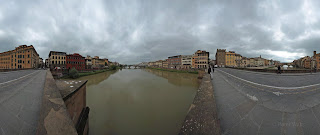
As usual with Panoramic Earth, these 50+ images are all accompanied with some local and travel information, and can be embedded by other websites as their own content. Included within the tour are stunning panoramas taken around Florence Cathedral, including a unique virtual tour of the interior of the Baptistery of San Giovanni, taken as not even local Florentines see it, without people present.
Friday, June 25, 2010
Viewing 360 Panoramas on iPad and iPhone
Krpano has been quick to take up the challenge of providing a way to view 360 panoramas on iPhone and iPad devices. Neither the iPhone or iPad support Flash, preventing many applications most web users take for granted, including the most popular panorama viewers, from working on them.
Krpano have already released a Javascript based viewer that uses CSS 3D transforms to display the panoramas. Currently there are still limitations, the CSS 3D transforms used are only available as Webkit extensions in the Mobile Safari and in the Mac Safari Browsers, and the viewer will only work with Cubic panoramas.
No doubt, further developments will follow, and it will not be long before Spherical, Equirectangular, Cylindrical, Small Planet, Partial panoramas and all the other projections we like to play around with will work on these mobile devices. At Panoramic Earth, we will follow this with keen interest, and are already seeking ways of implementing this for the panoramas we have.
Flash will probably still remain popular for many panorama viewers, but this demonstrates once again how fast technology moves on the web, and how quickly developers respond to the new opportunities and challenges.
Krpano have already released a Javascript based viewer that uses CSS 3D transforms to display the panoramas. Currently there are still limitations, the CSS 3D transforms used are only available as Webkit extensions in the Mobile Safari and in the Mac Safari Browsers, and the viewer will only work with Cubic panoramas.
No doubt, further developments will follow, and it will not be long before Spherical, Equirectangular, Cylindrical, Small Planet, Partial panoramas and all the other projections we like to play around with will work on these mobile devices. At Panoramic Earth, we will follow this with keen interest, and are already seeking ways of implementing this for the panoramas we have.
Flash will probably still remain popular for many panorama viewers, but this demonstrates once again how fast technology moves on the web, and how quickly developers respond to the new opportunities and challenges.
Thursday, May 27, 2010
A Taste of Spain, London 6th June
On the 6th of June London will see the Taste of Spain festival occupying the whole of Regent Street, between Piccadilly Circus and Oxford Street, in the heart of central London.
Supported by the Spanish Tourist Office, The Daily and Sunday Telegraph, the free festival will welcome many of the Spanish regions who will add colour and flair to the capital. With giant paellas, flamenco music, medieval food markets and a range of interactive sports challenges and events, visitors will be whisked away for a day to Spain's sunnier shores.
On the 24th and 25th July the Taste of Spain festival can be found on The Mound in Edinburgh.
Tuesday, May 04, 2010
Language Translations
While Panoramic Earth is set up with English as the main site, we recognize that many people are interested in adding information about their places in other languages. To help with that, members can apply for access to the language admin options within their profiles. This enables you to:
- Provide local translations for the country, region and image title.
- Manage translations for specific locations.
- Provide local and travel information in local language.
- Change relevant meta-data to optimize these language pages within search engines.
- Link to other pages within the site.
- Editing Style - help about the writing style used on Panoramic Earth and easy way to link images together.
- Destination Admin Help - walk-through guide to accessing and editing location procedures.
- Translation Help - walk-through guide to the language admin sections.
Subscribe to:
Posts (Atom)